Everyone is posting their AI setup and speed runs. Some of them are impressive, but some are risky to run. For example, I see people installing ClawdBot style setups that ask for broad tokens and permissions, run a lot of automation, and blur the line between helpful and dangerous. I wanted something I can reason about and lock down.
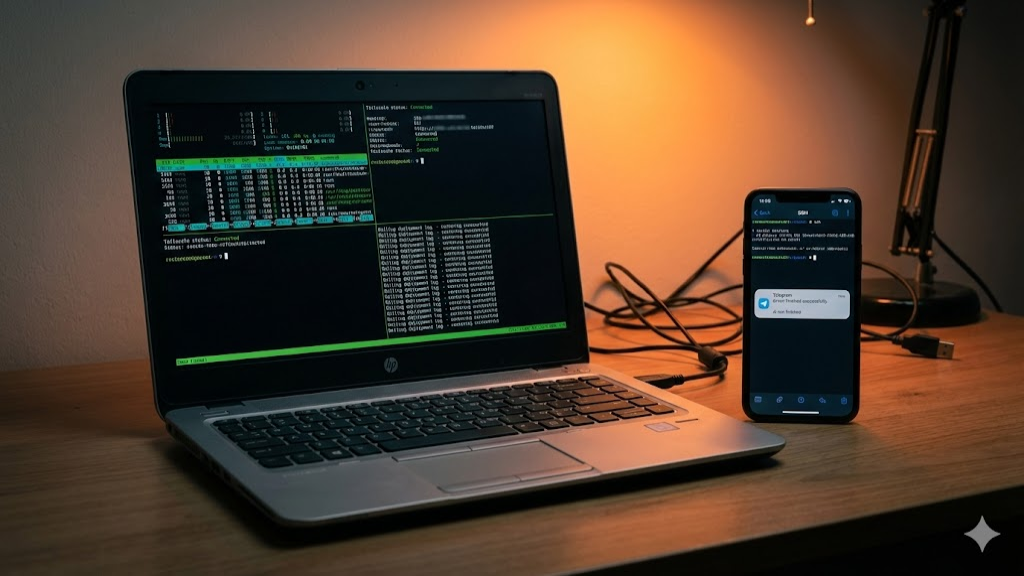
I wanted something boring, fast, and reliable. The goal is simple. I want to code from my phone, keep apps always on, and still do production deployments without needing my laptop open.
Two premises
- Mobile first is real. Not just checking logs. I want to edit code, run tests, and deploy while I am away from my desk.
- Always on beats clever. Serverless and free hosting like Vercel looks great on paper, but often results in a laggy user experience. I'm a tinkerer by nature and don't mind playing around a bit to get snappy performance.
My first server was Hetzner
I started on a Hetzner Cloud CCX23. It is a dedicated vCPU tier with 4 vCPUs, 16 GB RAM, and NVMe storage. It worked great for the price.
Then I remembered I already owned a server.
Putting an old laptop back to work
I had an old HP 640 G1 from around 2015 sitting in a corner. It has an i5 and 8 GB of RAM. Reusing it felt like a clean move in the spirit of minimalism and self hosting.
I wiped it, installed a fresh Ubuntu, and did the boring hardening work.
- Uninstall whatever I do not need
- Disable and stop unused services
- Enable automatic security updates
- Lock down SSH, add fail2ban, and use UFW
At that point I had a clean box that could run Codex and Claude Code, plus Postgres, Redis, and Node.
Problem one: remote access
At home it was perfect. Outside my home network it was useless.
The fix was Tailscale. It is a simple mesh VPN built on WireGuard. The install is basically copy paste.
curl -fsSL https://tailscale.com/install.sh | sh
sudo tailscale up
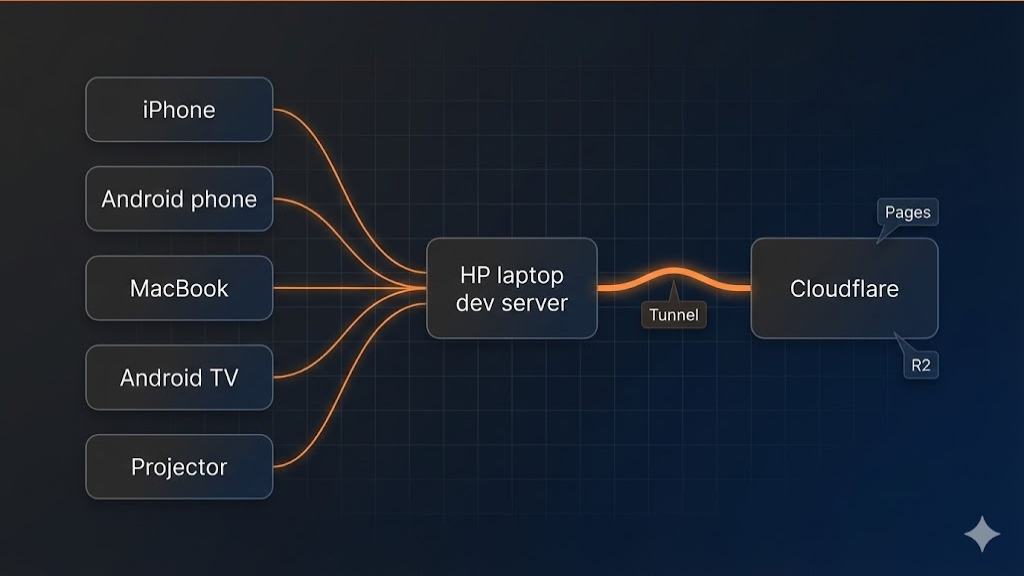
Once that is up, the laptop becomes reachable from anywhere via a private IP, without opening inbound firewall rules. I run Tailscale on everything, including my MacBook, iPhone, Android phone, Android TV, and even a projector.
Problem two: losing SSH sessions
If my SSH session drops, I lose context. Long running prompts, build logs, database work, it all gets annoying fast.
The fix is tmux. It keeps sessions alive on the server. You can disconnect and reconnect without losing work.
tmux new -s dev

# later
tmux attach -t dev
No idle time: Telegram notifications
Agents can run long, and approvals can block a workflow. If you switch tasks, you can waste time scrolling terminals to find the last important line.
So I wired a Telegram bot. On every Codex or Claude Code response, and on every approval request, it sends me a notification. That way I can move around and still return at the right moment.
Bare metal Postgres and Redis
I keep Postgres and Redis installed locally. For the kind of apps I build, that means predictable latency and fewer networking surprises.
How I expose local apps to the internet
This is where Cloudflare became my favorite layer.
- Cloudflare Tunnel maps a local port to a real domain without opening inbound firewall rules.
- Cloudflare Pages is great for static sites and landing pages.
- Cloudflare R2 is cheap object storage that works well for assets and backups.
The best part is automation. I created scoped Cloudflare API tokens and use them for tunnel handling, deployments, and backups. If you copy this, do it with least privilege and rotate keys.
Blue green deploys with Unix sockets
Most of my apps run behind Unix sockets. I use a simple blue green pattern by flipping a symlink between two sockets. Rollback is instant.
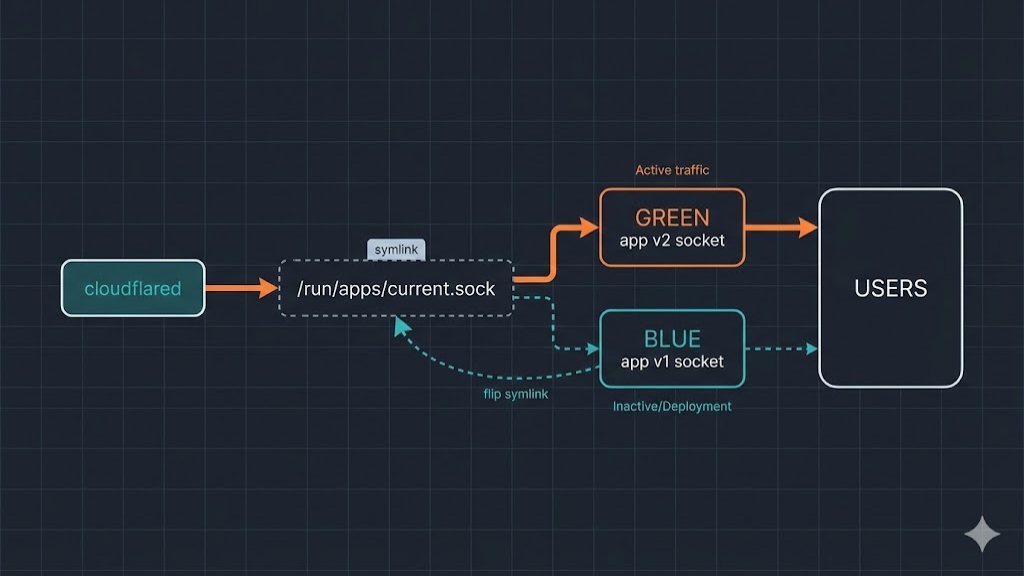
I also use Playwright to run a few real scenarios before I point traffic to a new version.
Why Wasp fits this workflow
This setup really clicked once I paired it with Wasp. Wasp is Y Combinator backed and built by a Croatian team. Wasp gives you a single, batteries included full stack workflow. It has a small DSL that describes your app in one place, and the framework wires client, server, database, auth, routing, and deployment primitives together.
That DSL is also a big reason Wasp works well with AI. The intent is explicit, so an agent can make changes without guessing how the app is stitched together.
Wasp also ships a Claude Code plugin that gives Claude the Wasp context so it can edit your project in a way that matches Wasp conventions. It is basically guardrails for AI changes. Read about it here.
What feels good in the first hour
- One workflow One project, one dev loop, no glue across separate repos
- Fast product driven data work Prisma models and migrations are part of the workflow, so adding a field and using it in React feels straightforward
- Auth is not a project Email and social providers can be enabled quickly, and session context stays consistent
- Server ops match UI needs Small operations for UI behavior without building a separate API layer
- Defaults reduce decisions Sensible conventions keep momentum when you are iterating fast
Why it worked well for Memoato
My first real test of this whole setup was memoato.com, and the code is open source on GitHub: hrvojepavlinovic/memoato-app.
Memoato is about speed and low friction. Wasp matched that because it let me iterate on UX features without fighting infrastructure. Examples where Wasp helped me move quickly include per user settings in the DB with clean UI usage, fast auth options like email plus Google, and rapid React experiments that still feel like one app.
I got to an MVP in four days and it felt smooth end to end.
I post builds regularly on X at @0xHP10. The setup caught the eye of the Wasp team at @WaspLang, and it led to a call where I met @MatijaSosic and @infomiho. They are building something special.
If you want Memoato updates, I also post at @memoatoo.
Coding from a phone is an unlock
With Tailscale on all my devices, I can SSH into the laptop from anywhere. On Android I use Termux. On iOS I use SSH clients like Termius, and lately I have been using Moshi because voice input changes the game.
Moshi lets you dictate directly into your terminal, and it can download speech models for offline use. Sometimes I literally ship while waiting in a car, or between sets at the gym.
It is a productivity unlock, and it is also addictive. I basically stopped using Instagram and TikTok because building is more interesting.
Special shoutout to Moshi and its founder @odd_joel for pushing voice to terminal UX forward.
If you want to copy this
- Start with Tailscale and tmux
- Add Telegram notifications so you do not waste time waiting
- Keep core services local and always on
- Expose only what you need via Cloudflare Tunnel
- Use scoped API tokens and rotate them
This setup is not magic. It is a private network, a persistent shell, and requires some boring setup. The result is that I can build and deploy from anywhere, even when I am away from my laptop.